
Overview
This topic shows how to create a variety of Cost of Sales (COGS) analyses using Crosstabulation Analysis. See How to Run a Crosstabulation Report for the basic process and below for the specific selections and Crosstab definitions required for COGS analyses.
Data File Selection
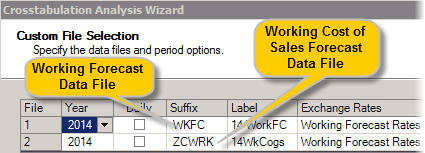
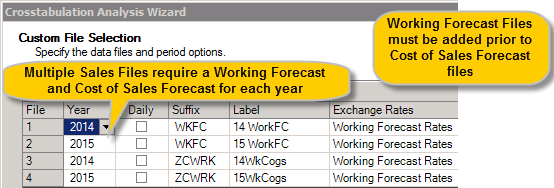
For each sales file to be included in the analysis you must include a corresponding Cost of Sales file which has been prepared as shown in Maintaining Cost of Sales Files, selected on the Custom File Selection screen. In the examples below, the WKFC (Working Forecast) file is the sales file and the ZCWRK (Working Cost of Sales Forecast) file is the corresponding Cost of Sales file.
Single Sales File
Multiple Sales Files
Item Selection and Reporting Options
Any combination of items may be included at any level of detail in any reporting currency.
Crosstabulation Definition Selection
Select the Crosstab for the required report format that matches the number of sales files.
Samples of Crosstabulation Definitions are attached below. You are recommended to store these definitions in a folder COGS Analyses
These definitions may be imported into your sales database using Reporting > Crosstabulation Definition Manager > COGS Analyses > Tools > Import.
Note: You may select multiple Crosstabulation Definitions when asked which File you would like to import.
The examples below show imported Crosstabulation Definitions and the respective reports they create:
Monthly COGS Analysis - 1 Sales File

Monthly GM % Analysis - 1 Sales File

COGS Summary Analysis - 1 Sales File

COGS Summary Analysis - 2 Sales Files

COGS Summary Analysis - 2 Sales Files with Variances

COGS Forecast vs YTD Analysis

Comments
0 comments
Please sign in to leave a comment.